一、导出接口变更
导出接口由原来的/jmreport/exportPdfStream更新为/jmreport/exportReport。具体见官方文档;
1、旧接口springboot实现报表生成并存储pdf文件
public String exportPdf(@RequestParam(name = "id", required = true) String id, @RequestParam(name = "excelConfigId", required = true)String excelConfigId, @RequestParam(name = "rootPath", required = true)String rootPath,@RequestParam(name = "url") String url) {
        // 1、创建url路径 RestUtil.getBaseUrl():你的地址
        String url = RestUtil.getBaseUrl() + "/jmreport/exportPdfStream";
        Map<String, Object> map = new HashMap<>();
        JSONObject object = new JSONObject();
        // 2、此处为示例,需要传递api和sql的正确参数值
        object.put("id", id); //积木报表中sql的传参
        map.put("excelConfigId", excelConfigId); //积木报表id
        map.put("queryParam", object);
        HTTPHeaders headers = new HttpHeaders);
        headers.add("Content-Type", "application/JSON;charset=UTF-8");
        HttpEntity<Map<String, Object>> httpEntity = new HttpEntity<>(map, headers);
        String filePath = "";
        try {
        	// 3、调用积木报表接口
            Resource apiResult = restTemplateConfig.restTemplateHttps().postForObject(url, httpEntity, Resource.class);
            // 4、拿到流
            InputStream inputStream = apiResult.getInputStream();
            byte[] bytes = IOUtils.toByteArray(inputStream);
            String s = "data:application/pdf;base64," + Base64.getEncoder().encodeToString(bytes);
            ByteArrayInputStream stream = null;
            BASE64Decoder decoder = new BASE64Decoder();
            byte[] bt = decoder.decodeBuffer(s);
            stream = new ByteArrayInputStream(bt);
            // 5、存储到minio中
            filePath = MinioUtil.upload(stream,rootPath+"/"+id+".pdf");
            // 6、关闭流
            inputStream.close();
        } catch (RestClientException e) {
            e.printStackTrace();
        } catch (IOException e) {
            e.printStackTrace();
        } catch (Exception e) {
            e.printStackTrace();
        }
        return filePath;
2、新接口实现
public String exportYbSbPdf(@RequestParam(name = "batchId", required = true) String batchId, @RequestParam(name = "communityId", required = true) String communityId, @RequestParam(name = "excelConfigId", required = true)String excelConfigId, @RequestParam(name = "rootPath", required = true)String rootPath,@RequestParam(name = "url", required = true)String url) {
        String filePath = "";
        try {
            // 查询参数
            JSONObject queryParam = new JSONObject();
            queryParam.put("batchId", batchId);
            queryParam.put("communityId", communityId);
            // 请求参数
            Map<String, Object> exportParams = new HashMap<>();
            exportParams.put("reportId", excelConfigId);
            exportParams.put("exportType", "pdf");
            exportParams.put("queryParam", queryParam);
            Map<String,Object> map = new HashMap<>();
            List<Map<String, Object>> list = new ArrayList<>();
            list.add(exportParams);
            map.put("exportParams", JSONObject.toJSONString(list));
            // 请求头
            HTTPHeaders headers = new HttpHeaders);
            headers.add("Content-Type", "application/JSON;charset=UTF-8");
            HttpEntity<Map<String, Object>> httpEntity = new HttpEntity<>(map, headers);
            url = "你的地址/jmreport/exportReport" + "?token="+((ServletRequestAttributes)RequestContextHolder.getRequestAttributes()).getRequest().getHeader("X-Access-Token")+"&exportParams=" + UriEncoder.encode(JSONObject.toJSONString(list));
            ResponseEntity<byte[]> responseEntity = restTemplateConfig.restTemplateHttps().getForEntity(url, byte[].class, httpEntity);

            if (responseEntity.getStatusCode().is2xxSuccessful()) {
                byte[] body = responseEntity.getBody();
                if (body == null || body.length == 0) {
                    throw new RuntimeException("导出内容为空");
                }

                ByteArrayInputStream inputStream = new ByteArrayInputStream(body);
                byte[] bytes = IOUtils.toByteArray(inputStream);
                String s = "data:application/pdf;base64," + Base64.getEncoder().encodeToString(bytes);
                ByteArrayInputStream stream = null;
                BASE64Decoder decoder = new BASE64Decoder();
                byte[] bt = decoder.decodeBuffer(s);
                stream = new ByteArrayInputStream(bt);
                filePath = MinioUtil.upload(stream,rootPath+"/"+batchId+"_"+communityId+".pdf");
                inputStream.close();
            } else {
                throw new RuntimeException("导出失败,HTTP状态码:" + responseEntity.getStatusCode());
            }
        } catch (RestClientException | IOException e) {
            e.printStackTrace();
            throw new RuntimeException("调用报表导出接口失败:" + e.getMessage());
        } catch (Exception e) {
            throw new RuntimeException(e);
        }
        return filePath;
    }
二、积木报表导出pdf出现第一个下面出现大量空白
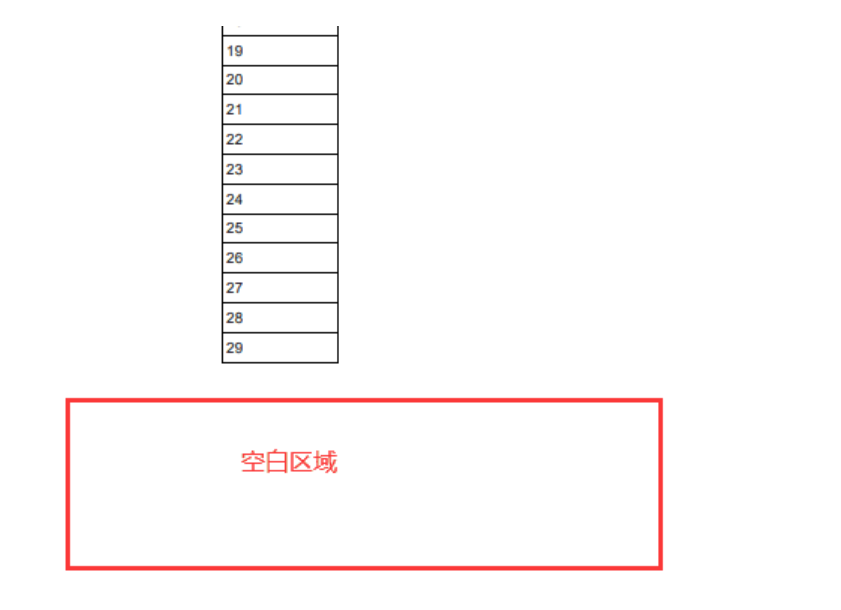
先说结论:此问题是由于"自动换行"导致的。给单元格设置自动换行其实就是允许单元格根据内容自动调整高度,那么打印时会有以下问题:
- 单元格
自动换行导致当前页面高度超出1页纸了,打印时会将该单元格调整至下一页打印,那么当前页的尾部就会出现部分空白区域:
三、积木报表中sql解析后数据类型不正确会导致数据无法预览
解决方案:非必要不填数据类型即可。
四、自我反思
1、升级版本时候要认真阅读升级日志及注意事项;
2、及时查询“调用接口”是否更改;
3、对于上述②③问题,我首先着手通过查看源码以寻求解决方案,最后碰巧解决;因为对于积木报表还是以官方文档为主寻找解决方式。