写在前面:本博客仅作记录学习之用,部分图片来自网络,如需引用请注明出处,同时如有侵犯您的权益,请联系删除!
文章目录
前言
在人工智能技术迅猛发展的当下,多模态大模型已然成为推动跨领域创新的核心引擎,为众多行业带来了前所未有的变革契机。这类模型凭借强大的泛化能力,在训练阶段吸收了海量跨模态数据,涵盖图像、文本、音频等多种形式,构建起一个庞大且复杂的知识体系,理论上具备处理各类相关任务的潜力。
由于大模型的训练集涵盖范围极为广泛,几乎触及了各个领域和场景的边缘。用户期望能充分利用其卓越的泛化性,为下游丰富多样的任务赋能,使其从理论上的“全能选手”转化为实际场景中的“实用专家”。毕竟,在现实应用中,不同行业、不同业务场景对模型的需求千差万别,通用的大模型往往难以精准满足每一个具体需求。
在此背景下,对大模型进行微调成为一种常见且行之有效的做法。通过微调,就像是为大模型配备了一把精准的“手术刀”,能够依据特定任务或某一小领域的独特需求,对模型的参数进行细致调整和优化。使大模型能够深度融入特定场景,为特定任务或小领域提供更加专业、高效的服务,从而真正释放多模态大模型的巨大价值,推动人工智能技术在各个领域的深度应用与创新发展。
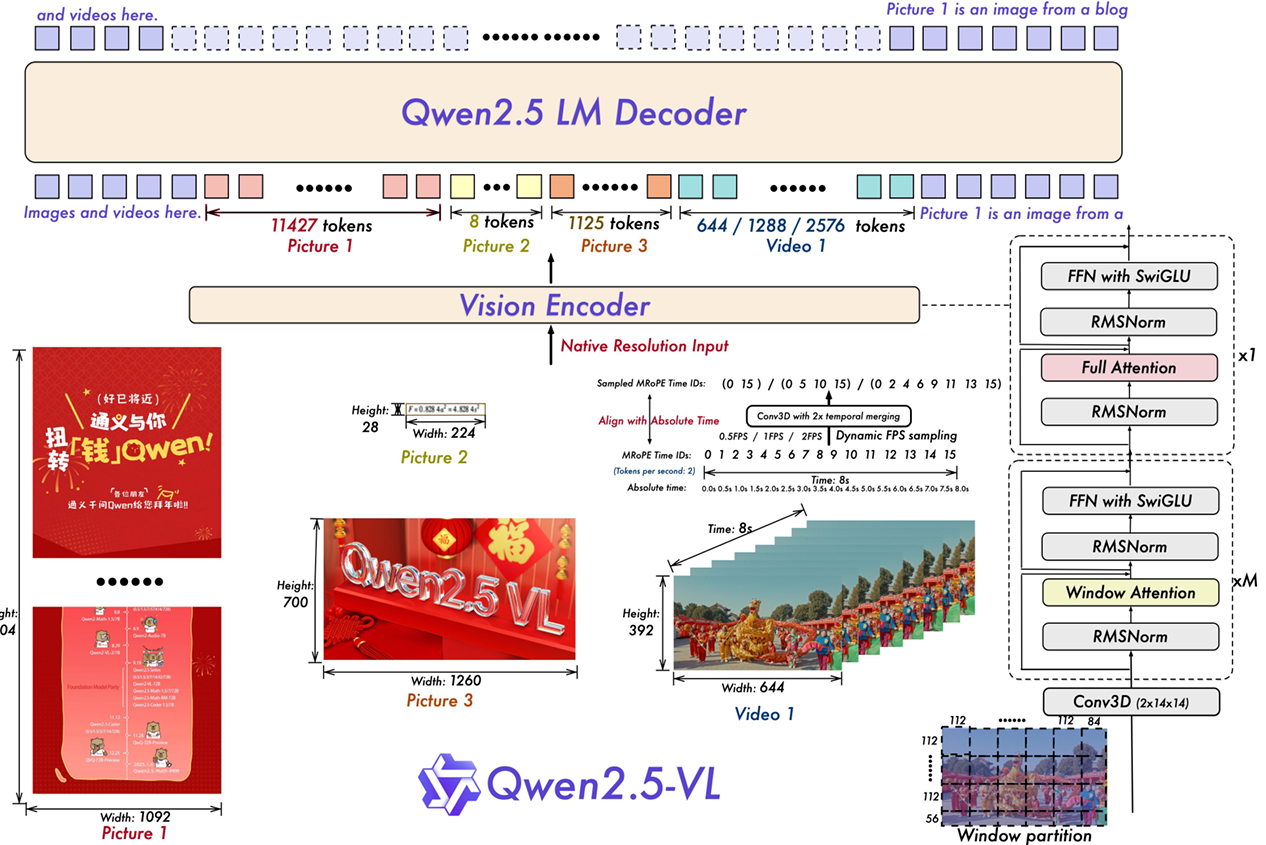
本文以Qwen2-VL-2B为例,从构建微调数据集、微调模型、加速推理等方面进行阐述,希望对叶子们有所帮助!相关论文可自行百度或等待更新。
环境及Qwen2-VL下载
环境说明
俗话说,抛开剂量谈毒性,纯虾扯蛋。抛开环境谈方法,也是虾扯蛋。因此先对环境依赖进行说明,关键的包如下,完整依赖见requirements.txt (链接失效请留言)。
qwen_omni_utils==0.0.8
qwen_vl_utils==0.0.11
tensorflow==2.19.0
tokenizer==3.4.5
torchvision==0.19.0
transformers==4.46.2
若沿用已有的环境,请先激活环境后在bash中执行:
conda activate your_envs_name
pip install -r requirements.txt
若新建环境,可参考下列命令创建环境并进行环境安装:
conda create -n qwen2_vl python==3.12
conda activate qwen2_vl
pip install -r requirements.txt
在 AutoDL社区环境 有对应环境,可直接点击前往。在此致谢 EAI工程笔记。
pip安装部分库可能安装失败,建议源码安装这部分库,如AutoGPTQ、flash-attention(可选,默认xformers加速)、swift。
git clone https://github.com/PanQiWei/AutoGPTQ.git && cd AutoGPTQ
pip install .

git clone https://github.com/Dao-AILab/flash-attention.git
cd flash-attention
python setup.py install

git clone https://github.com/modelscope/ms-swift.git
cd ms-swift
pip install -e .
源码下载
第一次微调需要从modelscope下载Qwen2-VL-2B,参考代码如下
from modelscope import snapshot_download, AutoTokenizer
from transformers import Qwen2VLForConditionalGeneration

# 在modelscope上下载Qwen2-VL模型到本地目录下
model_dir = snapshot_download("Qwen/Qwen2-VL-2B-Instruct", cache_dir="./", revision="master")

# 使用Transformers加载模型权重
tokenizer = AutoTokenizer.from_pretrained("./Qwen/Qwen2-VL-2B-Instruct/", use_fast=False, trust_remote_code=True)

# Qwen2-VL-2B-Instruct模型需要使用Qwen2VLForConditionalGeneration来加载
model = Qwen2VLForConditionalGeneration.from_pretrained("./Qwen/Qwen2-VL-2B-Instruct/", device_map="auto", torch_dtype=torch.bfloat16, trust_remote_code=True,)

model.enable_input_require_grads()  # 开启梯度检查点时,要执行该方法
构建微调数据集
构建json格式
此处以检测任务为例,主要是要构建QA形式和保存json格式。下列的代码逻辑是寻找图像和匹配标签生成csv文件后,转化json后进行特定比例划分训练集和测试集。
import os
import pandas as pd
from tqdm import tqdm
import json
import random
import cv2
from datasets import Dataset


def find_images_with_folder_labels(root_dir, image_extensions=('.jpg', '.png', '.bmp')):
    '''
    root_dir:包含 images 和 labels 两个文件夹
    读取配对的图像和标签,保存为.csv文件
    扩展:①扩展image_extensions的类型;②保存名字

    '''
    image_paths = []
    captions = []
    image_path = os.path.join(root_dir, "images")
    label_path = os.path.join(root_dir, "labels")

    # 遍历图像目录下的所有子文件夹
    for folder_name in tqdm(os.listdir(image_path)):
        image_data_path = os.path.join(image_path, folder_name)
        # 确保是文件夹而不是文件
        if os.path.isdir(image_data_path):
            # 遍历子文件夹中的所有文件
            for file_name in os.listdir(image_data_path):
                file_path = os.path.join(image_data_path, file_name)
                # 检查是否是图像文件
                if os.path.isfile(file_path) and file_name.lower().endswith(image_extensions):
                    # 检查对应标签文件是否存在
                    lable_image_path = os.path.join(label_path,folder_name,file_name.split(".")[0]+".txt")
                    if os.path.exists(lable_image_path):
                        # 读取标签信息
                        with open(lable_image_path, "r", encoding="utf-8") as file:
                            content = file.read()  # 读取整个文件内容
                        image_paths.append(file_path)
                        captions.append(content)
                    else:
                        print(f"no found :{lable_image_path}")
        else:
            print(f"no found :{folder_name}")

    df = pd.DataFrame({
        'image_path': image_paths,
        'caption': captions
    })

    df.to_csv('./train-dataset.csv', index=False)

def convert_json():
    '''
    转化为json文件,内容为对话信息,读取上述保存的.csv文件,对于没有目标的图像,设置标签"-1 -1 -1 -1 -1"
    '''
    class_name = ["drone", "car", "ship", "bus", "pedestrian", "cyclist"]
    df = pd.read_csv('./train-dataset.csv')
    conversations = []
    conversations_test = []

    # 添加对话数据
    for i in range(len(df)):
        if pd.isna(df.iloc[i]['caption']):
            caption = "-1 -1 -1 -1 -1"
        else:
            caption = df.iloc[i]['caption']
        targets = [target.strip() for target in caption.split('\n')]

        all_targets_info = []
        for target in targets:
            parts = target.split()
            # 空集
            if len(parts) < 5:
                continue
            try:
                target_info = {
                    "class": class_name[int(parts[0])],
                    "cx": float(parts[1]),
                    "cy": float(parts[2]),
                    "width": float(parts[3]),
                    "height": float(parts[4])
                }
                all_targets_info.append(target_info)
            except ValueError as e:
                print(f"Skipping numeric error at row {i}: {e}")
                continue
        # 没有有效目标
        if not all_targets_info:
            continue

        # 格式化输出
        formatted_value = "; ".join([
            f"class: {t['class']}, cx: {t['cx']}, cy: {t['cy']}, width: {t['width']}, height: {t['height']}"
            for t in all_targets_info
        ])

        # 构建对话内容
        conversations.append({
            "id": f"identity_{i+1}",
            "conversations": [
                {
                    "from": "user",
                    "value": f"Please identify small and dim targets in infrared images and provide their location information: <|vision_start|>{df.iloc[i]['image_path']}<|vision_end|>"
                },
                {
                    "from": "assistant",
                    "value": formatted_value
                }
            ]
        })


    # 保存为json
    with open('data_vl.json', 'w', encoding='utf-8') as f:
        json.dump(conversations, f, ensure_ascii=False, indent=2)

def split_json_by_ratio(input_path, train_path, test_path, train_ratio=0.8, seed=42):
    """
    按比例随机切分 JSON 数据(列表形式)

    Args:
        input_path (str): 输入 JSON 文件路径
        train_path (str): 训练集输出路径
        test_path (str): 测试集输出路径
        train_ratio (float): 训练集比例(默认 0.8)
        seed (int): 随机种子(确保可复现)
    """
    try:
        # 读取 JSON 数据
        with open(input_path, 'r') as f:
            data = json.load(f)

        # 检查数据是否为列表
        if not isinstance(data, list):
            raise ValueError("Input JSON must be a list of items.")

        # 设置随机种子(确保每次切分结果一致)
        random.seed(seed)
        random.shuffle(data)  # 打乱数据顺序

        # 计算切分点
        split_idx = int(len(data) * train_ratio)
        train_data = data[:split_idx]
        test_data = data[split_idx:]

        # 写入文件(美化 JSON 格式)
        with open(train_path, 'w') as f:
            json.dump(train_data, f, indent=4)

        with open(test_path, 'w') as f:
            json.dump(test_data, f, indent=4)

        print(f"Split completed! Train: {len(train_data)}, Test: {len(test_data)}")

    except FileNotFoundError:
        print(f"Error: File {input_path} not found.")
    except Exception as e:
        print(f"Error: {str(e)}")

def get_img_from_json(example):
    """
    获取json的测试文件
    """
    MAX_LENGTH = 10000
    input_ids, attention_mask, labels = [], [], []
    conversation = example["conversations"]
    input_content = conversation[0]["value"]
    output_content = conversation[1]["value"]
    file_path = input_content.split("<|vision_start|>")[1].split("<|vision_end|>")[0]  # 获取图像路径
    name = file_path.split("/")[-1]
    image = cv2.imread(file_path)
    cv2.imwrite(os.path.join(os.getcwd(),'test',name),image)


# 使用示例
if __name__ == "__main__":
    root_directory = "dataset"  # 替换为你的根目录路径
    find_images_with_folder_labels(root_directory)
    convert_json()
    split_json_by_ratio(
        input_path="data_vl.json",
        train_path="data_vl_train.json",
        test_path="data_vl_test.json",
        train_ratio=0.8  # 80% 训练,20% 测试
    )
对话内容如下:
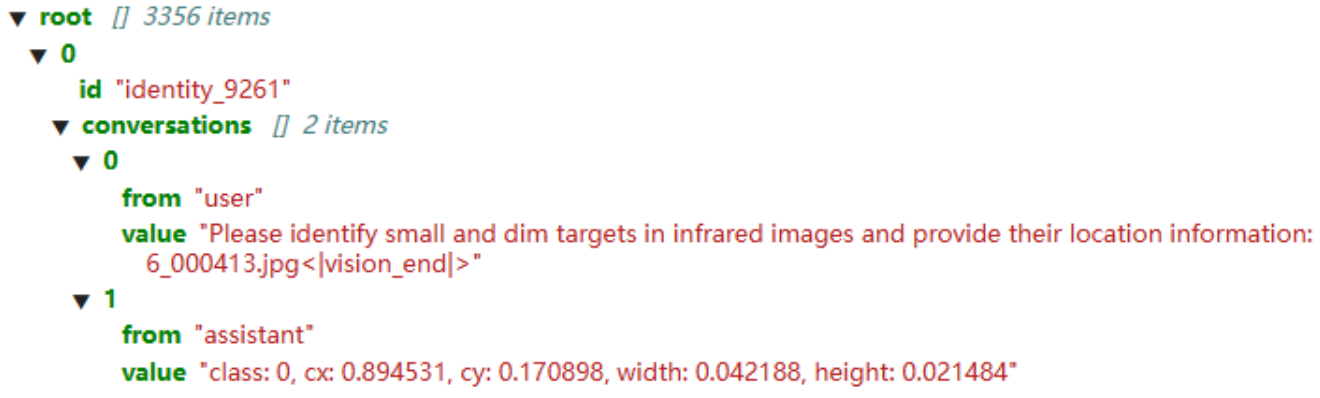
因此在后续获取图像路径需要特定分隔符进行划分,如.split("<|vision_start|>")[1].split("<|vision_end|>")[0]。
数据增强
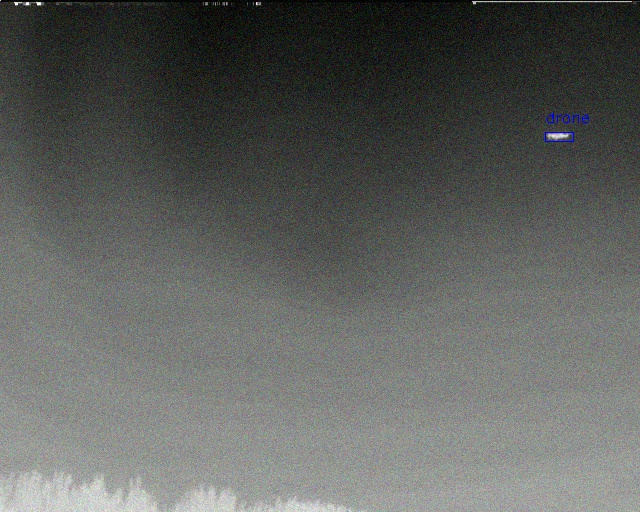
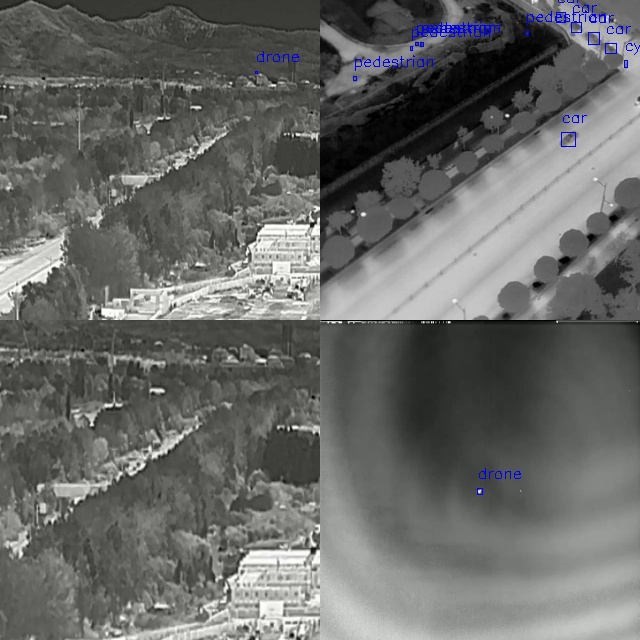
默认使用了翻转、crop、噪音、mosaic。下列代码需要根据实际数据格式进行调整,如chage_style_out、chage_style_in等。
放两个效果图:
import cv2
import numpy as np
import random
from typing import List, Tuple, Union
import re

class DataAugmenter:
    def __init__(self):
        self.CLASS_NAMES = ["class1", "class2", "class3", "class4", "class5", "class6"]
        pass

    def __call__(self, image: np.ndarray, labels: List[List[Union[float, int]]]) -> Tuple[np.ndarray, List[List[float]]]:
        """
        对图像和YOLO标签进行数据增强
        参数: image: 输入图像 (H, W, C)
            labels: YOLO格式标签列表,每个标签为 [class, cx, cy, w, h] (相对坐标)
        返回:  增强后的图像和对应的标签
        """
        # 随机选择要应用的数据增强方法
        labels = self.chage_style_in(labels)
        augmentations = []
        if random.random() > 0.5:
            augmentations.append(self.random_horizontal_flip)
        if random.random() > 0.5:
            augmentations.append(self.random_vertical_flip)
        if random.random() > 0.5:
            augmentations.append(self.random_noise)

        for aug in augmentations:
            image, labels = aug(image, labels)

        labels = self.chage_style_out(labels)
        return image, labels

    def chage_style_out(self, labels):
        result_parts = []
        for label in labels:
            cls = self.CLASS_NAMES[label[0]]
            cx, cy, width, height = label[1], label[2], label[3], label[4]
            label = f"class: {cls}, cx: {cx}, cy: {cy}, width: {width}, height: {height}"
            result_parts.append(label)
        labels = "; ".join(result_parts)
        return labels

    def chage_style_in(self, labels):
        if type(labels) is list:
            return labels

        else:
            if labels == '':
                return []
            results = []
            total = labels.split("; ")
            for label in total:
                cls = label.split(", ")[0].split(": ")[1]
                cx = label.split(", ")[1].split(": ")[1]
                cy = label.split(", ")[2].split(": ")[1]
                w = label.split(", ")[3].split(": ")[1]
                h = label.split(", ")[4].split(": ")[1]
                results.append([int(self.CLASS_NAMES.index(cls)),float(cx),float(cy),float(w),float(h)] )
            return results

    def random_horizontal_flip(self, image: np.ndarray, labels: List[List[float]]) -> Tuple[np.ndarray, List[List[float]]]:
        """随机水平翻转"""
        if random.random() > 0.5:
            # print("随机水平翻转")
            h, w = image.shape[:2]
            image = cv2.flip(image, 1)
            # 更新标签
            for label in labels:
                label[1] = 1.0 - label[1]  # cx = 1 - cx
        return image, labels

    def random_vertical_flip(self, image: np.ndarray, labels: List[List[float]]) -> Tuple[np.ndarray, List[List[float]]]:
        """随机垂直翻转"""
        if random.random() > 0.5:
            h, w = image.shape[:2]
            image = cv2.flip(image, 0)
            # 更新标签
            for label in labels:
                label[2] = 1.0 - label[2]  # cy = 1 - cy
        return image, labels

    def random_noise(self, image: np.ndarray, labels: List[List[float]]) -> Tuple[np.ndarray, List[List[float]]]:
        """添加随机噪声"""
        if random.random() > 0.5:
            h, w, c = image.shape
            noise = np.random.normal(0, 0.05, (h, w, c)) * 255
            image = np.clip(image + noise, 0, 255).astype(np.uint8)
        return image, labels

    def random_crop(self, image: np.ndarray, labels: List[List[float]]) -> Tuple[np.ndarray, List[List[float]]]:
        """随机裁剪"""
        h, w = image.shape[:2]
        # 随机选择裁剪比例
        crop_ratio = random.uniform(0.4, 0.8)
        # new_h, new_w = int(h * crop_ratio), int(w * crop_ratio)
        new_size = int(min(h, w) * crop_ratio)  # 取较小边作为正方形边长
        new_h, new_w = new_size, new_size
        # 随机选择裁剪起点
        y_start = random.randint(0, h - new_h)
        x_start = random.randint(0, w - new_w)
        # 执行裁剪
        image = image[y_start:y_start+new_h, x_start:x_start+new_w]
        # 更新标签 - 只保留裁剪后仍然在图像中的边界框
        new_labels = []
        x_ratio = new_w / w
        y_ratio = new_h / h

        for label in labels:
            cls, cx, cy, bw, bh = label
            # 计算边界框的绝对坐标
            x_min = (cx - bw/2) * w
            y_min = (cy - bh/2) * h
            x_max = (cx + bw/2) * w
            y_max = (cy + bh/2) * h
            # 检查边界框是否在裁剪区域内
            if (x_min >= x_start and x_max <= x_start + new_w and
                y_min >= y_start and y_max <= y_start + new_h):
                # 计算裁剪后的相对坐标
                new_cx = ((cx * w) - x_start) / new_w
                new_cy = ((cy * h) - y_start) / new_h
                new_labels.append([cls, new_cx, new_cy, bw, bh])  # 宽高比例不变
        return image, new_labels

    def mosaic(self, images_labels: List[Tuple[np.ndarray, List[List[float]]]],
               img_size: int = 640) -> Tuple[np.ndarray, List[List[float]]]:
        """
        Mosaic增强 (需要4张图像和标签)
        参数:images_labels: 包含4个(image, labels)元组的列表
            img_size: 输出图像大小
        返回: 合并后的图像和对应的标签
        """
        if len(images_labels) != 4:
            raise ValueError("Mosaic requires 4 images and labels")

        # 创建空白画布
        mosaic_img = np.full((img_size, img_size, 3), 114, dtype=np.uint8)
        # 分割点均分
        yc, xc = [img_size//2 for _ in range(2)]
        all_labels = []
        # 处理4个区域
        for i, (img, labels) in enumerate(images_labels):
            h, w = img.shape[:2]
            # 确定当前区域的位置和大小
            if i == 0:  # 左上
                x1a, y1a, x2a, y2a = 0, 0, xc, yc
                x1b, y1b, x2b, y2b = 0, 0, xc, yc  # 直接取画布区域大小
            elif i == 1:  # 右上
                x1a, y1a, x2a, y2a = xc, 0, img_size, yc
                x1b, y1b, x2b, y2b = 0, 0, img_size - xc, yc  # 修正计算方式
            elif i == 2:  # 左下
                x1a, y1a, x2a, y2a = 0, yc, xc, img_size
                x1b, y1b, x2b, y2b = 0, 0, xc, img_size - yc
            elif i == 3:  # 右下
                x1a, y1a, x2a, y2a = xc, yc, img_size, img_size
                x1b, y1b, x2b, y2b = 0, 0, img_size - xc, img_size - yc
            # 调整图像大小并放置到画布上
            target_w, target_h = x2a - x1a, y2a - y1a  # 目标区域大小
            img_resized = cv2.resize(img, (target_w, target_h))  # 修正 resize 参数顺序 (width, height)
            mosaic_img[y1a:y2a, x1a:x2a] = img_resized
            # 调整标签labels
            # print(labels)
            labels = self.chage_style_in(labels)
            for label in labels:
                cls, cx, cy, bw, bh = label
                # 转换为绝对坐标
                x_abs = cx * (x2b - x1b) + x1b
                y_abs = cy * (y2b - y1b) + y1b
                w_abs = bw * (x2b - x1b)
                h_abs = bh * (y2b - y1b)
                # 转换为mosaic图像的相对坐标
                new_cx = (x_abs + x1a - x1b) / img_size
                new_cy = (y_abs + y1a - y1b) / img_size
                new_bw = w_abs / img_size
                new_bh = h_abs / img_size
                all_labels.append([cls, new_cx, new_cy, new_bw, new_bh])
        return mosaic_img, all_labels

    def mixup(self, img1: np.ndarray, labels1: List[List[float]],
              img2: np.ndarray, labels2: List[List[float]],
              alpha: float = 2) -> Tuple[np.ndarray, List[List[float]]]:
        """
        MixUp增强参数:
            img1, labels1: 第一张图像和标签
            img2, labels2: 第二张图像和标签
            alpha: MixUp权重参数
			返回: 混合后的图像和标签
        """
        # 调整第二张图像大小与第一张相同
        img2 = cv2.resize(img2, (img1.shape[1], img1.shape[0]))
        # 随机权重
        lam = np.random.beta(alpha, alpha)
        # 混合图像
        mixed_img = cv2.addWeighted(img1, lam, img2, 1 - lam, 0)
        # 混合标签
        mixed_labels = []
        for label1, label2 in zip(labels1, labels2):
            mixed_label = [
                label1[0],  # 类保持不变
                lam * label1[1] + (1 - lam) * label2[1],  # cx
                lam * label1[2] + (1 - lam) * label2[2],  # cy
                lam * label1[3] + (1 - lam) * label2[3],  # w
                lam * label1[4] + (1 - lam) * label2[4]   # h
            ]
            mixed_labels.append(mixed_label)
        return mixed_img, mixed_labels

def rectangle_target(classes, image, img_h, img_w, boxes,color,thin=1):
    '''
    画框,检测数据增强的标签的准确性
    支持格式:[[0, 0.22, 0.33, 0.123, 0.321]]
    '''
    for target in boxes:
        class_id = classes[target[0]]
        cx, cy   = target[1], target[2]
        w, h     = target[3], target[4]
        x_center_pixel = cx * img_w
        y_center_pixel = cy * img_h
        box_w_pixel = w * img_w
        box_h_pixel = h * img_h
        # 3. 计算矩形框坐标(左上角和右下角)
        x1 = int(x_center_pixel - box_w_pixel / 2)
        y1 = int(y_center_pixel - box_h_pixel / 2)
        x2 = int(x_center_pixel + box_w_pixel / 2)
        y2 = int(y_center_pixel + box_h_pixel / 2)
        # 绘制矩形框和标签
        cv2.rectangle(image, (x1, y1), (x2, y2), color, thin)
        # 可选:绘制标签背景和文字
        cv2.putText(image, class_id, (x1, y1 - 10), cv2.FONT_HERSHEY_SIMPLEX, 0.5, color, thin)
    return image
mosaic、mixup需要单独调用,因为需要的图像数量大于1,参考如下:
    if random.random() < 0.3:
        #  mosaic
        images_labels = []
        # 随机打乱,取top3
        random_samples = train_ds.shuffle(seed=2025).select(range(3))
        # 读取信息以备mosaic
        for sample in random_samples:
            # 读取信息
            conversation_sample = sample["conversations"]
            input_content_sample = conversation_sample[0]["value"]
            output_content_sample = conversation_sample[1]["value"]
            file_path_sample = input_content_sample.split("<|vision_start|>")[1].split("<|vision_end|>")[0]  # 获取图像路径
            image_sample = cv2.imread(file_path_sample)

            # crop 拼接
            output_content_sample = augmenter.chage_style_in(output_content_sample)
            image_sample, output_content_sample =  augmenter.random_crop(image_sample, output_content_sample)
            output_content_sample = augmenter.chage_style_out(output_content_sample)
            images_labels.append((image_sample, output_content_sample))

        images_labels.append((image, output_content))
        image, output_content = augmenter.mosaic(images_labels)
        # mosaic 的图像大小为640x640
        img_h = 640
        img_w = 640
        output_content = augmenter.chage_style_out(output_content)
LoRA微调
项目位置
- 更改项目的位置,以实际位置为准。
    tokenizer = AutoTokenizer.from_pretrained("./Qwen/Qwen2-VL-2B-Instruct/", use_fast=False, trust_remote_code=True)
    processor = AutoProcessor.from_pretrained("./Qwen/Qwen2-VL-2B-Instruct")
    model = Qwen2VLForConditionalGeneration.from_pretrained("./Qwen/Qwen2-VL-2B-Instruct/", device_map="auto", torch_dtype=torch.bfloat16, trust_remote_code=True,)
    model.enable_input_require_grads()  # 开启梯度检查点时,要执行该方法
配置LoRA
可修改target_modules,低秩数、dropout比例等,为避免过拟合lora_dropout一定要设置。
    config = LoraConfig(
        task_type=TaskType.CAUSAL_LM,
        target_modules=["q_proj", "k_proj", "v_proj", "o_proj", "gate_proj", "up_proj", "down_proj"],
        inference_mode=False,  # 训练模式
        r=8,  # Lora 秩
        lora_alpha=16,  # Lora alaph,具体作用参见 Lora 原理
        lora_dropout=0.05,  # Dropout 比例
        bias="none",
    )
训练参数
可修改保存路径、bs、学习率、epoch等,但学习率一般比较小。显存较小时,可设置梯度累积gradient_accumulation_steps为想要的bs数。
    # 配置训练参数
    args = TrainingArguments(
        output_dir="./output/Qwen2-VL-2B-name",  # 修改为想要的保存路径
        per_device_train_batch_size=1,
        gradient_accumulation_steps=8,
        logging_steps=1000,
        num_train_epochs=10,
        save_steps=1000,
        learning_rate=1e-4,
        save_on_each_node=True,
        gradient_checkpointing=True,
        report_to="none",
    )
完整代码
from datasets import Dataset
from modelscope import AutoTokenizer
from qwen_vl_utils import process_vision_info
from peft import LoraConfig, TaskType, get_peft_model
from transformers import (
    TrainingArguments,
    Trainer,
    DataCollatorForSeq2Seq,
    Qwen2VLForConditionalGeneration,
    AutoProcessor,
)

import torch
import json
from PIL import Image
import cv2
import os
from augment import DataAugmenter
import random

augmenter = DataAugmenter()
random.seed(2025)


def process_func(example):
    """
    数据预处理:40%概率不进行数据增强
    30%概率常规数据增强:翻转、corp、噪声
    30%概率进行mosaic:避免训练集一张图中单一检测结果
    """
    MAX_LENGTH = 10000
    input_ids, attention_mask, labels = [], [], []
    conversation = example["conversations"]
    input_content = conversation[0]["value"]
    output_content = conversation[1]["value"]
    file_path = input_content.split("<|vision_start|>")[1].split("<|vision_end|>")[0]  # 获取图像路径
    image = cv2.imread(file_path)

    CLASS_NAMES = ["class1", "class2", "class3", "class4", "class5", "class6"]
    img_h, img_w = image.shape[:2]
    COLORS = [(0, 255, 0), (255, 0, 0)]

    if random.random() > 0.7:
         # 常规数据增强:翻转、corp、噪声
        image, output_content = augmenter(image, output_content)
        # 标签转化
        output_content = augmenter.chage_style_in(output_content)
        # 保存增强样本
        image = rectangle_target(CLASS_NAMES,image, img_h, img_w, output_content, COLORS[-1],1)
        cv2.imwrite("./batch_aug.jpg",image)
        # 标签转化
        output_content = augmenter.chage_style_out(output_content)
    if random.random() < 0.3:
        #  mosaic
        images_labels = []
        # 随机打乱,取top3
        random_samples = train_ds.shuffle(seed=2025).select(range(3))
        # 读取信息以备mosaic
        for sample in random_samples:
            # 读取信息
            conversation_sample = sample["conversations"]
            input_content_sample = conversation_sample[0]["value"]
            output_content_sample = conversation_sample[1]["value"]
            file_path_sample = input_content_sample.split("<|vision_start|>")[1].split("<|vision_end|>")[0]  # 获取图像路径
            image_sample = cv2.imread(file_path_sample)
            # crop 拼接
            output_content_sample = augmenter.chage_style_in(output_content_sample)
            image_sample, output_content_sample =  augmenter.random_crop(image_sample, output_content_sample)
            output_content_sample = augmenter.chage_style_out(output_content_sample)
            images_labels.append((image_sample, output_content_sample))
        images_labels.append((image, output_content))
        image, output_content = augmenter.mosaic(images_labels)
        # mosaic 的图像大小为640x640
        img_h = 640
        img_w = 640
        # 保存样本
        image = rectangle_target(CLASS_NAMES,image, img_h, img_w, output_content, COLORS[-1],1)
        cv2.imwrite("./batch_mosaic.jpg",image)
        output_content = augmenter.chage_style_out(output_content)
    # QA 仅支持PIL格式,不支持CV2格式
    image = Image.fromarray(image)
    # 构造QA,图像默认输入224x224
    messages = [
        {
            "role": "user",
            "content": [
                {
                    "type": "image",
                    "image": image,
                    "resized_height": 224,
                    "resized_width": 224,
                },
                {"type": "text", "text": "Please identify small and dim targets in infrared images and provide their location information:"},
            ],
        }
    ]

    text = processor.apply_chat_template(
        messages, tokenize=False, add_generation_prompt=True
    )  # 获取文本

    # process_vision_info 加工数据
    image_inputs, video_inputs = process_vision_info(messages)  # 获取数据数据(预处理过)
    inputs = processor(
        text=[text],
        images=image_inputs,
        videos=video_inputs,
        padding=True,
        return_tensors="pt",
    )

    inputs = {key: value.tolist() for key, value in inputs.items()} #tensor -> list,为了方便拼接
    instruction = inputs
    response = tokenizer(f"{output_content}", add_special_tokens=False)
    input_ids = (
            instruction["input_ids"][0] + response["input_ids"] + [tokenizer.pad_token_id]
    )
    attention_mask = instruction["attention_mask"][0] + response["attention_mask"] + [1]
    labels = (
            [-100] * len(instruction["input_ids"][0])
            + response["input_ids"]
            + [tokenizer.pad_token_id]
    )
    if len(input_ids) > MAX_LENGTH:  # 做一个截断
        input_ids = input_ids[:MAX_LENGTH]
        attention_mask = attention_mask[:MAX_LENGTH]
        labels = labels[:MAX_LENGTH]

    input_ids = torch.tensor(input_ids)
    attention_mask = torch.tensor(attention_mask)
    labels = torch.tensor(labels)
    inputs['pixel_values'] = torch.tensor(inputs['pixel_values'])
    inputs['image_grid_thw'] = torch.tensor(inputs['image_grid_thw']).squeeze(0)  #由(1,h,w)变换为(h,w)
    return {"input_ids": input_ids, "attention_mask": attention_mask, "labels": labels,
            "pixel_values": inputs['pixel_values'], "image_grid_thw": inputs['image_grid_thw']}

def rectangle_target(classes, image, img_h, img_w, boxes,color,thin=1):
    '''
    画框,检测数据增强的标签的准确性
    支持格式:[[0, 0.22, 0.33, 0.123, 0.321]]
    '''
    for target in boxes:
        class_id = classes[target[0]]
        cx, cy   = target[1], target[2]
        w, h     = target[3], target[4]
        x_center_pixel = cx * img_w
        y_center_pixel = cy * img_h
        box_w_pixel = w * img_w
        box_h_pixel = h * img_h
        x1 = int(x_center_pixel - box_w_pixel / 2)
        y1 = int(y_center_pixel - box_h_pixel / 2)
        x2 = int(x_center_pixel + box_w_pixel / 2)
        y2 = int(y_center_pixel + box_h_pixel / 2)
        cv2.rectangle(image, (x1, y1), (x2, y2), color, thin)
        cv2.putText(image, class_id, (x1, y1 - 10), cv2.FONT_HERSHEY_SIMPLEX, 0.5, color, thin)
    return image

if __name__ == "__main__":
    # 使用Transformers加载模型权重
    tokenizer = AutoTokenizer.from_pretrained("./Qwen/Qwen2-VL-2B-Instruct/", use_fast=False, trust_remote_code=True)
    processor = AutoProcessor.from_pretrained("./Qwen/Qwen2-VL-2B-Instruct")
    model = Qwen2VLForConditionalGeneration.from_pretrained("./Qwen/Qwen2-VL-2B-Instruct/", device_map="auto", torch_dtype=torch.bfloat16, trust_remote_code=True,)
    model.enable_input_require_grads()  # 开启梯度检查点时,要执行该方法
    # 读取训练数据
    train_ds = Dataset.from_json("data_vl_train.json")
    train_dataset = train_ds.map(process_func)
    # 配置LoRA
    config = LoraConfig(
        task_type=TaskType.CAUSAL_LM,
        target_modules=["q_proj", "k_proj", "v_proj", "o_proj", "gate_proj", "up_proj", "down_proj"],
        inference_mode=False,  # 训练模式
        r=8,  # Lora 秩
        lora_alpha=16,  # Lora alaph,具体作用参见 Lora 原理
        lora_dropout=0.1,  # Dropout 比例
        bias="none",
    )
    # 获取LoRA模型
    peft_model = get_peft_model(model, config)
    # 配置训练参数
    args = TrainingArguments(
        output_dir="./output/Qwen2-VL-2B-test",
        per_device_train_batch_size=1,
        gradient_accumulation_steps=8,
        logging_steps=1000,
        num_train_epochs=10,
        save_steps=1000,
        learning_rate=1e-4,
        save_on_each_node=True,
        gradient_checkpointing=True,
        report_to="none",
    )
    # 配置Trainer
    trainer = Trainer(
        model=peft_model,
        args=args,
        train_dataset=train_dataset,
        data_collator=DataCollatorForSeq2Seq(tokenizer=tokenizer, padding=True),
    )
    # 开启模型训练
    trainer.train()
当然,也可以使用swift进行微调,swift微调,需要去查询SFT微调的各个参数。上述代码各个环节可见,下列代码则是简洁,调用即可。
SIZE_FACTOR=8 MAX_PIXELS=602112 CUDA_VISIBLE_DEVICES=0 swift sft \
    --model_type qwen2_vl\
    --model ./Qwen/Qwen2-VL-2B-Instruct  \
    --dataset ./data_vl_train.json  \
    --learning_rate 1e-4 \
    --num_train_epochs 10 \
    --logging_steps 10 \
    --gradient_accumulation_steps 8 \
    --lora_dropout 0.5 \
    --lora_dtype bfloat16
测试
加载LoRA低秩权重推理
建议先修改配置,各类参数需要和训练时一致,参考如下:
# 配置测试参数,此处需要和训练时配置一样,除了inference_mode
val_config = LoraConfig(
    task_type=TaskType.CAUSAL_LM,
    target_modules=["q_proj", "k_proj", "v_proj", "o_proj", "gate_proj", "up_proj", "down_proj"],
    inference_mode=True,  # 推理模式一定要改成true
    r=8,                  # Lora 秩
    lora_alpha=16,        # Lora alaph,具体作用参见 Lora 原理
    lora_dropout=0.05,    # Dropout 比例
    bias="none",
)
# 需要提供LoRA的训练checkpoint
val_peft_model = PeftModel.from_pretrained(model, model_id="./output/Qwen2-VL-2B-aug/checkpoint-15000", config=val_config)
参考代码:
import cv2
import numpy as np
import os
import json
import torch
from tqdm import tqdm
from PIL import Image
import re
from peft import LoraConfig, TaskType, PeftModel
from modelscope import AutoTokenizer
from qwen_vl_utils import process_vision_info
from transformers import (
    Qwen2VLForConditionalGeneration,
    AutoProcessor,
)


def predict(messages, model):
    # 推理
    text = processor.apply_chat_template(messages, tokenize=False, add_generation_prompt=True)
    image_inputs, video_inputs = process_vision_info(messages)
    inputs = processor(
        text=[text],
        images=image_inputs,
        videos=video_inputs,
        padding=True,
        return_tensors="pt",
    )
    inputs = inputs.to("cuda")

    # 生成输出
    generated_ids = model.generate(**inputs, max_new_tokens=512)
    generated_ids_trimmed = [
        out_ids[len(in_ids) :] for in_ids, out_ids in zip(inputs.input_ids, generated_ids)
    ]
    output_text = processor.batch_decode(
        generated_ids_trimmed, skip_special_tokens=True, clean_up_tokenization_spaces=False
    )

    return output_text[0]


def parse_dynamic_fields(text, field_aliases,class_ids):
    '''
    大模型输出转标签格式,采取正则化匹配
    由于大模型的输出分割符、关键字可能出错,采取动态生成正则表达式
    '''
    # 动态生成正则表达式
    pattern_parts = []
    for field, aliases in field_aliases.items():
        aliases_regex = "|".join(map(re.escape, aliases))
        if field == "class_id":
            pattern_parts.append(f"(?:{aliases_regex})\\s*[:=]?\\s*(\\w+)\\s*[,;]?\\s*")
        else:
            pattern_parts.append(f"(?:{aliases_regex})\\s*[:=]?\\s*([\\d.]+)\\s*[,;]?\\s*")
    pattern = r"|".join(pattern_parts)

    # 匹配所有字段
    matches = re.findall(pattern, text, re.VERBOSE)

    # 提取有效字段
    extracted = []
    for group in matches:
        extracted.extend([field for field in group if field])

    # 按 5 个字段一组分割,( class,cx,cy,w,h)
    targets = []
    for i in range(0, len(extracted), 5):
        chunk = extracted[i:i+5]
        if len(chunk) == 5:
            try:
                class_box = class_ids.index(chunk[0])
                box = [float(chunk[1]),float(chunk[2]),float(chunk[3]),float(chunk[4])]
                info = (class_box,box)
                targets.append(info)
            except:
                # 内容,此处不做处理
                continue
        else:
            # 受限于token输出被截断,此处不做处理
            pass

    return targets


def rectangle_target(classes, image, img_h, img_w, boxes,color,thin=1):
    '''
    画框,检测数据增强的标签的准确性
    支持格式:[[0, 0.22, 0.33, 0.123, 0.321]]
    '''
    for target in boxes:
        class_id = classes[target[0]]
        cx, cy   = target[1][0], target[1][1]
        w, h     = target[1][2], target[1][3]

        x_center_pixel = cx * img_w
        y_center_pixel = cy * img_h
        box_w_pixel = w * img_w
        box_h_pixel = h * img_h

        # 3. 计算矩形框坐标(左上角和右下角)
        x1 = int(x_center_pixel - box_w_pixel / 2)
        y1 = int(y_center_pixel - box_h_pixel / 2)
        x2 = int(x_center_pixel + box_w_pixel / 2)
        y2 = int(y_center_pixel + box_h_pixel / 2)

        # 4. 绘制矩形框和标签
        cv2.rectangle(image, (x1, y1), (x2, y2), color, thin)

        # 可选:绘制标签背景和文字
        cv2.putText(image, class_id, (x1, y1 - 10), cv2.FONT_HERSHEY_SIMPLEX, 0.5, color, thin)
    return image


if __name__ == "__main__":
    # 保存检测结果的路径
    save_path = "./results/test_aug_result"
    if not os.path.exists(save_path):
        os.mkdir(save_path)

    # 配置测试参数,此处需要和训练时配置一样
    val_config = LoraConfig(
        task_type=TaskType.CAUSAL_LM,
        target_modules=["q_proj", "k_proj", "v_proj", "o_proj", "gate_proj", "up_proj", "down_proj"],
        inference_mode=True,  # 推理模式
        r=8,                  # Lora 秩
        lora_alpha=16,        # Lora alaph,具体作用参见 Lora 原理
        lora_dropout=0.05,    # Dropout 比例
        bias="none",
    )
    # 获取测试模型
    model = Qwen2VLForConditionalGeneration.from_pretrained("./Qwen/Qwen2-VL-2B-Instruct/", device_map="auto", torch_dtype=torch.bfloat16, trust_remote_code=False)
    # 需要提供LoRA的训练checkpoint
    val_peft_model = PeftModel.from_pretrained(model, model_id="./output/Qwen2-VL-2B/checkpoint-5000", config=val_config)
    tokenizer = AutoTokenizer.from_pretrained("./Qwen/Qwen2-VL-2B-Instruct/", use_fast=True, trust_remote_code=True)
    processor = AutoProcessor.from_pretrained("./Qwen/Qwen2-VL-2B-Instruct")
    model = torch.compile(model)

    # 读取测试数据
    with open("data_vl_test.json", "r") as f:
        test_dataset = json.load(f)

    # 类别名称和颜色(根据class_id选择)
    CLASS_NAMES = ["class1", "class2", "class3", "class4", "class5", "class6"]
    COLORS = [(0, 255, 0), (255, 0, 0)]  # BGR格式

    # 字段名别名映射,大模型输出关键字可能错误的样例y
    field_aliases = {
        "class_id": ["class", "lass"],
        "x_center": ["cx", "x"],
        "y_center": ["cy", "y"],
        "width": ["width", "w"],
        "height": ["height", "h"],
    }
    current_dir = os.getcwd()
    for index, item in tqdm(enumerate(test_dataset), total=len(test_dataset)):
        # 获取提示词
        input_image_prompt = item["conversations"][0]["value"]
        # 去掉前后的<|vision_start|>和<|vision_end|>获取图像路径
        origin_image_path = input_image_prompt.split("<|vision_start|>")[1].split("<|vision_end|>")[0]
        # 获取基本信息
        name = origin_image_path.split("/")[-1] # 文件名
        pre_file = origin_image_path.split("/")[-2] # 上一级目录名
        image = cv2.imread(origin_image_path)  # 读取图像获取宽高,便于画框
        img_h, img_w = image.shape[:2]
        image_PIL = Image.fromarray(image)

        # 构造QA
        messages = [{
            "role": "user",
            "content": [
                {
                    "type": "image",
                    "image": image_PIL
                },
                {
                    "type": "text",
                    "text": "Please identify small and dim targets in infrared images and provide their location information:"
                }
            ]}]

        #保存预测结果的位置,需要结合上一级目录
        pre_path = os.path.join(current_dir, "eva/predictions-test")
        if not os.path.exists(pre_path):
            os.mkdir(pre_path)

        # 创建对应视频名的文件夹
        pre_dir = os.path.join(pre_path,pre_file)
        if not os.path.exists(pre_dir):
            os.mkdir(pre_dir)
        #创建空白标签文件,即使没有检测到也需要,避免后续测试保留上次测试的结果
        open(os.path.join(pre_dir,name.split(".")[0]+".txt"), "w", encoding="utf-8").close()
            # 预测结果
        responses = predict(messages, val_peft_model)  # 大模型
        merge_target = parse_dynamic_fields(responses, field_aliases,CLASS_NAMES)

        # 大模型输出转化为标签
        with open(os.path.join(pre_dir,name.split(".")[0]+".txt"), "a", encoding="utf-8") as file:  # "a" 表示追加模式
            for target in merge_target:
                # print(target,type(target))
                class_id = target[0]
                cx, cy   = target[1][0], target[1][1]
                w, h     = target[1][2], target[1][3]
                predict_lable = f"{class_id} {cx} {cy} {w} {h}\n"
                file.write(predict_lable)
        # 绘制检测框
        image = rectangle_target(CLASS_NAMES,image, img_h, img_w, merge_target, COLORS[-1],1)

        # ----------------------------------读取对话标签,对比显示(可选)----------------------------------------
        # ----------------------------非第一次测试以快速测试性能,建议注释下列代码----------------------------------------
        label_infos = item["conversations"][1]["value"]
        try:
            label_targets = label_infos.split("; ")
        except:
            label_targets = label_infos
        # 放置标签文件夹
        pre_path = os.path.join(current_dir, "eva/ground_truth")
        pre_dir = os.path.join(pre_path,pre_file)
        if not os.path.exists(pre_dir):
            os.mkdir(pre_dir)
        # 放置图像位置
        if not os.path.exists(os.path.join(save_path,pre_file)):
            os.mkdir(os.path.join(save_path,pre_file))

        # 创建空白标签文件,即使没有检测到也需要,避免后续测试保留上次测试的结果
        open(os.path.join(pre_dir,name.split(".")[0]+".txt"), "w", encoding="utf-8").close()
        box_label = []
        with open(os.path.join(pre_dir,name.split(".")[0]+".txt"), "a", encoding="utf-8") as file:  # "a" 表示追加模式
            for label_info in label_targets:
                label_info = label_info.split(",")
                label_class_id       = label_info[0].split(": ")[1]
                label_cx, label_cy   = float(label_info[1].split(": ")[1]), float(label_info[2].split(": ")[1])
                label_w, label_h     = float(label_info[3].split(": ")[1]), float(label_info[4].split(": ")[1])
                index = CLASS_NAMES.index(label_class_id)
                gt_lable = f"{index} {label_cx} {label_cy} {label_w} {label_h}\n"
                box_label.append([index,[label_cx,label_cy,label_w,label_h]])
                file.write(gt_lable)
        # 绘制标签框
        image = rectangle_target(CLASS_NAMES,image, img_h, img_w, box_label, COLORS[0],1)
        cv2.imwrite(os.path.join(save_path,pre_file,name), image)
合并LoRA低秩权重推理
合并主要依赖于merge_and_unload()函数,可选手动合并和swfit合并,注意基础模型和LoRA权重的数据类型,避免数据精度带来的误差。
合并LoRA权重
修改lora_model_path为微调checkpoint目录,参考代码:
from transformers import AutoModelForCausalLM, AutoTokenizer,Qwen2VLForConditionalGeneration,AutoModel
from peft import PeftModel
import torch
from swift.utils import copy_files_by_pattern

if __name__ == "__main__":
    print(" 1. 加载基础模型和Tokenizer")
    base_model_path = "./Qwen/Qwen2-VL-2B-Instruct/"
    tokenizer = AutoTokenizer.from_pretrained(base_model_path, trust_remote_code=True)
    base_model = Qwen2VLForConditionalGeneration.from_pretrained(
        base_model_path,
        device_map="cpu",  # 自动分配设备(如 GPU)
        torch_dtype=torch.bfloat16,  # 半精度减少显存占用
        trust_remote_code=True
    )
    print(" 2. 加载LoRA适配器")
    lora_model_path = "./output/Qwen2-VL-2B/checkpoint-16800"
    lora_model = PeftModel.from_pretrained(
        base_model,
        lora_model_path,
        device_map="cpu",
        torch_dtype=torch.bfloat16,
    )
    print(" 3. 合并LoRA权重到基础模型")
    merged_model = lora_model.merge_and_unload()
    print(" 4. 保存合并后的模型和Tokenizer")
    output_dir = "./output/Qwen2-VL-2B-aug/checkpoint-16800-merged"
    merged_model.save_pretrained(output_dir, safe_serialization=True)  # 保存为safetensors格式
    tokenizer.save_pretrained(output_dir)  # 确保Tokenizer与模型匹配
    copy_files_by_pattern(base_model_path, output_dir, '*.py')
    copy_files_by_pattern(base_model_path, output_dir, '*.json')
    print(f"合并后的模型已保存至: {output_dir}")
或者使用swift进行合并
swift export \
    --model 'Qwen/Qwen2-VL-2B-Instruct' \
    --ckpt_dir 'output/Qwen2-VL-2B/checkpoint-2000' \
    --model_type qwen2_vl \
    --merge_lora true \
    --load_data_args false \
    --dataset ./data_vl_train.json \
    --device_map cpu \
    --output_dir 'output/Qwen2-VL-2B/checkpoint-2000-merged'
合并后推理
加载合并后的权重进行推理即可,分词器和基础模型一致即可。由于和上述不合并的时候差不多,因此只放主函数。
if __name__ == "__main__":
    # 保存检测结果的路径
    save_path = "./results/test_merged_result"
    if not os.path.exists(save_path):
        os.mkdir(save_path)
    # 获取测试模型
    model = Qwen2VLForConditionalGeneration.from_pretrained("./output/Qwen2-VL-2B-aug/checkpoint-5000-merged", device_map="auto", \
                                                            model_type="qwen2_vl",\
                                                            torch_dtype=torch.bfloat16, \
                                                            trust_remote_code=False)
    tokenizer = AutoTokenizer.from_pretrained("./output/Qwen2-VL-2B/checkpoint-5000-merged", \
                                              model_type="qwen2_vl",\
                                              use_fast=True, \
                                              trust_remote_code=True)
    processor = AutoProcessor.from_pretrained("./output/Qwen2-VL-2B/checkpoint-5000-merged")
    # 读取测试数据
    with open("data_vl_test.json", "r") as f:
        test_dataset = json.load(f)

    # 类别名称和颜色(根据class_id选择)
    CLASS_NAMES = ["class1", "class2", "class3", "class4", "class5", "class6"]
    COLORS = [(0, 255, 0), (255, 0, 0)]  # BGR格式

    # 字段名别名映射,大模型输出关键字可能错误的样例y
    field_aliases = {
        "class_id": ["class", "lass"],
        "x_center": ["cx", "x"],
        "y_center": ["cy", "y"],
        "width": ["width", "w"],
        "height": ["height", "h"],
    }

    for index, item in tqdm(enumerate(test_dataset), total=len(test_dataset)):
        # 获取提示词
        input_image_prompt = item["conversations"][0]["value"]
        # 去掉前后的<|vision_start|>和<|vision_end|>获取图像路径
        origin_image_path = input_image_prompt.split("<|vision_start|>")[1].split("<|vision_end|>")[0]
        # 获取基本信息
        name = origin_image_path.split("/")[-1] # 文件名
        pre_file = origin_image_path.split("/")[-2] # 上一级目录名
        image = cv2.imread(origin_image_path)  # 读取图像获取宽高,便于画框
        img_h, img_w = image.shape[:2]
        image_PIL = Image.fromarray(image)

        # 构造QA
        messages = [{
            "role": "user",
            "content": [
                {
                    "type": "image",
                    "image": image_PIL
                },
                {
                    "type": "text",
                    "text": "Please identify small and dim targets in infrared images and provide their location information:"
                }
            ]}]

        #保存预测结果的位置,需要结合上一级目录
        pre_path = "/root/autodl-tmp/Qwen2_VL/eva/predictions-merged"
        if not os.path.exists(pre_path):
            os.mkdir(pre_path)

        # 创建对应视频名的文件夹
        pre_dir = os.path.join(pre_path,pre_file)
        if not os.path.exists(pre_dir):
            os.mkdir(pre_dir)

        #创建空白标签文件,即使没有检测到也需要,避免后续测试保留上次测试的结果
        open(os.path.join(pre_dir,name.split(".")[0]+".txt"), "w", encoding="utf-8").close()

        # 预测结果
        responses = predict(messages, model)  # 大模型
        merge_target = parse_dynamic_fields(responses, field_aliases,CLASS_NAMES)

        # 大模型输出转化为标签
        with open(os.path.join(pre_dir,name.split(".")[0]+".txt"), "a", encoding="utf-8") as file:  # "a" 表示追加模式
            for target in merge_target:
                # print(target,type(target))
                class_id = target[0]
                cx, cy   = target[1][0], target[1][1]
                w, h     = target[1][2], target[1][3]
                predict_lable = f"{class_id} {cx} {cy} {w} {h}\n"
                file.write(predict_lable)
        # 绘制检测框
        image = rectangle_target(CLASS_NAMES,image, img_h, img_w, merge_target, COLORS[-1],1)

        # ----------------------------------读取对话标签,对比显示(可选)----------------------------------------
        # ----------------------------非第一次测试以快速测试性能,建议注释下列代码----------------------------------------
        label_infos = item["conversations"][1]["value"]
        try:
            label_targets = label_infos.split("; ")
        except:
            label_targets = label_infos
        # 放置标签文件夹
        pre_path = "/root/autodl-tmp/Qwen2_VL/eva/ground_truth"
        pre_dir = os.path.join(pre_path,pre_file)
        if not os.path.exists(pre_dir):
            os.mkdir(pre_dir)
        # 放置图像位置
        if not os.path.exists(os.path.join(save_path,pre_file)):
            os.mkdir(os.path.join(save_path,pre_file))

        # 创建空白标签文件,即使没有检测到也需要,避免后续测试保留上次测试的结果
        open(os.path.join(pre_dir,name.split(".")[0]+".txt"), "w", encoding="utf-8").close()
        box_label = []
        with open(os.path.join(pre_dir,name.split(".")[0]+".txt"), "a", encoding="utf-8") as file:  # "a" 表示追加模式
            for label_info in label_targets:
                label_info = label_info.split(",")
                label_class_id       = label_info[0].split(": ")[1]
                label_cx, label_cy   = float(label_info[1].split(": ")[1]), float(label_info[2].split(": ")[1])
                label_w, label_h     = float(label_info[3].split(": ")[1]), float(label_info[4].split(": ")[1])
                index = CLASS_NAMES.index(label_class_id)
                gt_lable = f"{index} {label_cx} {label_cy} {label_w} {label_h}\n"
                box_label.append([index,[label_cx,label_cy,label_w,label_h]])
                file.write(gt_lable)
        # 绘制标签框
        image = rectangle_target(CLASS_NAMES,image, img_h, img_w, box_label, COLORS[0],1)
        cv2.imwrite(os.path.join(save_path,pre_file,name), image)
量化及vllm加速推理
Qwen2-VL-2B的权重大致4G左右,对于边缘设备不太友好,因此可以尝试量化减少其体积及其资源的占用,此处以GPTQ为例,量化为INT8/INT4。
建议采取swift 量化,直接调用auto_gptq的可能存在无法识别qwen2_vl 的情况,使用swift则不会。
INT4量化
SIZE_FACTOR=8 MAX_PIXELS=602112 swift export \
    --ckpt_dir 'output/Qwen2-VL-2B/checkpoint-16800-merged' \
    --model_type qwen2_vl \
    --quant_bits 4 \
    --load_data_args false \
    --quant_method gptq \
    --dataset /root/autodl-tmp/Qwen2_VL/data_vl_train.json \
    --device_map auto \
    --output_dir 'output/Qwen2-VL-2B/checkpoint-16800-merged-gptq-int4'
SIZE_FACTOR=8 MAX_PIXELS=602112 swift export \
    --ckpt_dir 'output/Qwen2-VL-2B-aug/checkpoint-2000-merged' \
    --model_type qwen2_vl \
    --quant_bits float8 \
    --load_data_args false \
    --quant_method awq \
    --dataset /root/autodl-tmp/Qwen2_VL/data_vl_train.json \
    --device_map auto \
    --output_dir 'output/Qwen2-VL-2B-aug/checkpoint-2000-merged-awq-fp8'
加速推理
加速推理通过vllm实现,简言之对transformer注意力进行优化,提升了推理速度。
engine = VllmEngine(model, max_model_len=2048)
request_config = RequestConfig(max_tokens=512, temperature=0)
参考代码如下,部分画框和正则化的函数是一致的,此处删掉了重复的部分。
import os,sys
os.environ['CUDA_VISIBLE_DEVICES'] = '0'
os.environ['MAX_PIXELS'] = '40960'
os.environ['VIDEO_MAX_PIXELS'] = '50176'
os.environ['FPS_MAX_FRAMES'] = '12'

import cv2
import numpy as np

import json
import torch
from tqdm import tqdm
from PIL import Image
import re
from peft import LoraConfig, TaskType, get_peft_model, PeftModel
from modelscope import snapshot_download, AutoTokenizer
from qwen_vl_utils import process_vision_info
from transformers import (
    TrainingArguments,
    Trainer,
    DataCollatorForSeq2Seq,
    Qwen2VLForConditionalGeneration,
    AutoProcessor,
)

from swift.llm import PtEngine, RequestConfig, InferRequest, VllmEngine

if __name__ == "__main__":
    # 保存检测结果的路径
    save_path = "./results/test_vllm_result"
    if not os.path.exists(save_path):
        os.mkdir(save_path)

    # 获取测试模型
    model = './output/Qwen2-VL-2B/checkpoint-3000-merged-gptq-int4'

    # 加载推理引擎
    engine = VllmEngine(model, max_model_len=2048) # ,vllm_gpu_memory_utilization=0.9
    request_config = RequestConfig(max_tokens=512, temperature=0)

    # 读取测试数据
    with open("data_vl_test.json", "r") as f:
        test_dataset = json.load(f)

    # 类别名称和颜色(根据class_id选择)
    CLASS_NAMES = ["class1", "class2", "class3", "class4", "class5", "class6"]
    COLORS = [(0, 255, 0), (255, 0, 0)]  # BGR格式

    # 字段名别名映射,大模型输出关键字可能错误的样例y
    field_aliases = {
        "class_id": ["class", "lass"],
        "x_center": ["cx", "x"],
        "y_center": ["cy", "y"],
        "width": ["width", "w"],
        "height": ["height", "h"],
    }

    # 构建测试序列
    for index, item in tqdm(enumerate(test_dataset), total=len(test_dataset)):
        # 获取提示词
        input_image_prompt = item["conversations"][0]["value"]
        # 去掉前后的<|vision_start|>和<|vision_end|>获取图像路径
        origin_image_path = input_image_prompt.split("<|vision_start|>")[1].split("<|vision_end|>")[0]
        # 获取基本信息
        image = cv2.imread(origin_image_path)  # 读取图像获取宽高,便于画框
        image_PIL = Image.fromarray(image)

        # 构造QA
        messages = [{
            "role": "user",
            "content": [
                {
                    "type": "image",
                    "image": image_PIL
                },
                {
                    "type": "text",
                    "text": "Please identify small and dim targets in infrared images and provide their location information:"
                }
            ]}]
        infer_requests = [InferRequest(messages)]


        # 预测结果
        resp_list = engine.infer(infer_requests, request_config)

        #保存预测结果的位置,需要结合上一级目录
        pre_path = "./eva/predictions-vllm"
        if not os.path.exists(pre_path):
            os.mkdir(pre_path)

        name = origin_image_path.split("/")[-1] # 文件名
        pre_file = origin_image_path.split("/")[-2] # 上一级目录名
        image = cv2.imread(origin_image_path)  # 读取图像获取宽高,便于画框
        img_h, img_w = image.shape[:2]

        # 创建对应视频名的文件夹
        pre_dir = os.path.join(pre_path,pre_file)
        if not os.path.exists(pre_dir):
            os.mkdir(pre_dir)

        #创建空白标签文件,即使没有检测到也需要,避免后续测试保留上次测试的结果
        open(os.path.join(pre_dir,name.split(".")[0]+".txt"), "w", encoding="utf-8").close()

        responses = resp_list[0].choices[0].message.content
        # print(responses)

        merge_target = parse_dynamic_fields(responses, field_aliases,CLASS_NAMES)

        # 大模型输出转化为标签
        with open(os.path.join(pre_dir,name.split(".")[0]+".txt"), "a", encoding="utf-8") as file:  # "a" 表示追加模式
            for target in merge_target:
                # print(target,type(target))
                class_id = target[0]
                cx, cy   = target[1][0], target[1][1]
                w, h     = target[1][2], target[1][3]
                predict_lable = f"{class_id} {cx} {cy} {w} {h}\n"
                file.write(predict_lable)
        # 绘制检测框
        image = rectangle_target(CLASS_NAMES,image, img_h, img_w, merge_target, COLORS[-1],1)

        # ----------------------------------读取对话标签,对比显示(可选)----------------------------------------
        # ----------------------------非第一次测试以快速测试性能,建议注释下列代码----------------------------------------
        label_infos = item["conversations"][1]["value"]
        try:
            label_targets = label_infos.split("; ")
        except:
            label_targets = label_infos
        # 放置标签文件夹
        pre_path = "./eva/ground_truth"
        pre_dir = os.path.join(pre_path,pre_file)
        if not os.path.exists(pre_dir):
            os.mkdir(pre_dir)
        # 放置图像位置
        if not os.path.exists(os.path.join(save_path,pre_file)):
            os.mkdir(os.path.join(save_path,pre_file))

        # 创建空白标签文件,即使没有检测到也需要,避免后续测试保留上次测试的结果
        open(os.path.join(pre_dir,name.split(".")[0]+".txt"), "w", encoding="utf-8").close()
        box_label = []
        with open(os.path.join(pre_dir,name.split(".")[0]+".txt"), "a", encoding="utf-8") as file:  # "a" 表示追加模式
            for label_info in label_targets:
                label_info = label_info.split(",")
                label_class_id       = label_info[0].split(": ")[1]
                label_cx, label_cy   = float(label_info[1].split(": ")[1]), float(label_info[2].split(": ")[1])
                label_w, label_h     = float(label_info[3].split(": ")[1]), float(label_info[4].split(": ")[1])
                index = CLASS_NAMES.index(label_class_id)
                gt_lable = f"{index} {label_cx} {label_cy} {label_w} {label_h}\n"
                box_label.append([index,[label_cx,label_cy,label_w,label_h]])
                file.write(gt_lable)
        # 绘制标签框
        image = rectangle_target(CLASS_NAMES,image, img_h, img_w, box_label, COLORS[0],1)
        cv2.imwrite(os.path.join(save_path,pre_file,name), image)
swift 部署
可以通过deploy 函数实现简单部署,从而可以实现环回地址的特定端口的访问,结合穿透工具可以实现公网访问。
CUDA_VISIBLE_DEVICES=0 swift deploy \
    --model_type qwen2_vl \
    --model 'output/Qwen2-VL-2B-aug/checkpoint-2000-merged' \
    --infer_backend vllm \
    --port 6006
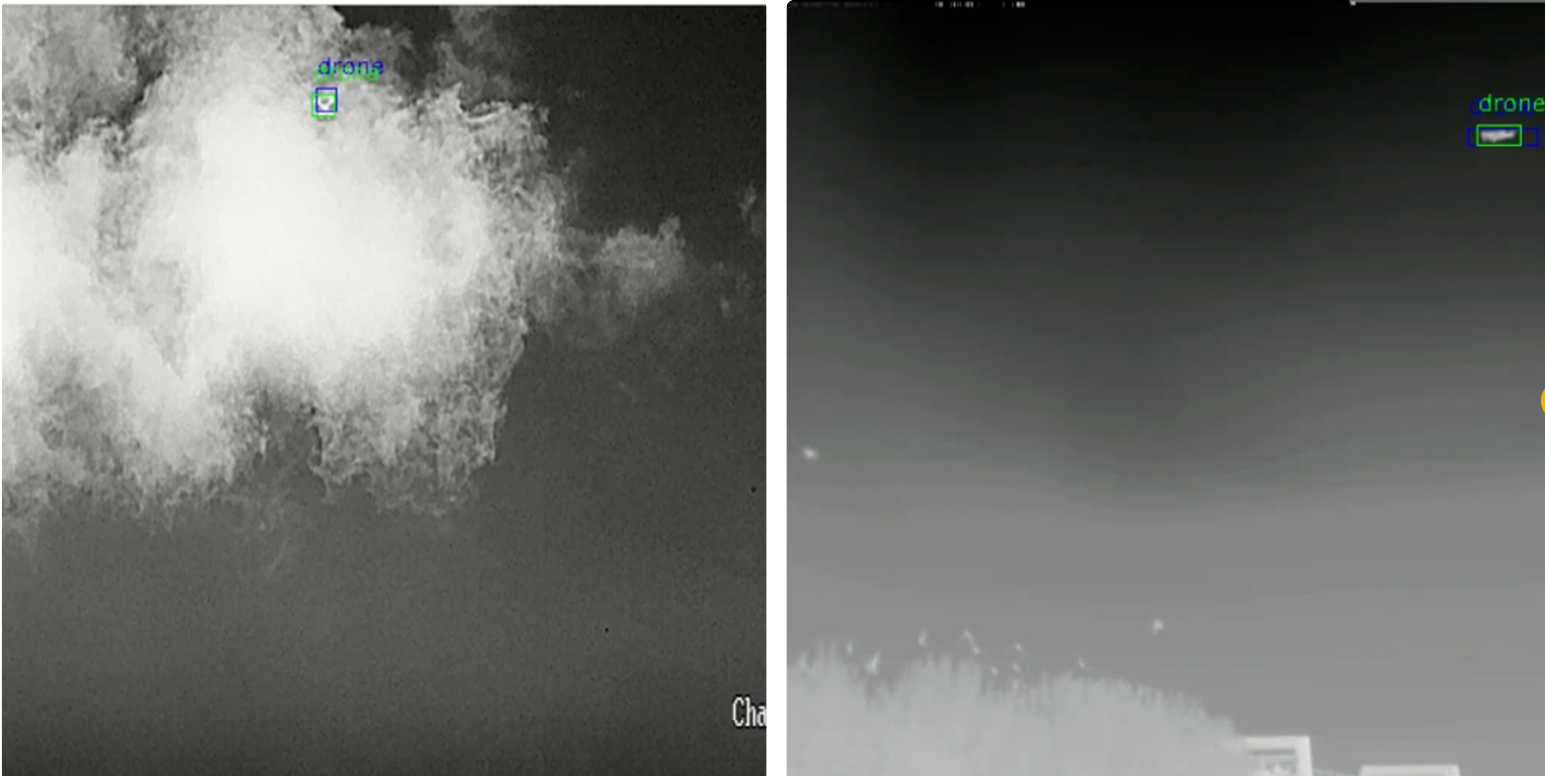
最后,放两个效果图:
总结
总结: 本文围绕Qwen2-VL-2B模型展开,从环境搭建、数据集构建、模型微调、测试评估到加速部署,形成完整技术闭环。在环境配置上,明确关键依赖包版本,提供新建/沿用环境两种方案,并针对源码安装问题给出具体解决路径。数据集构建环节,以检测任务为例,详细说明图像-标签配对、JSON格式转换及数据划分流程,同时提供包含翻转、裁剪、噪声添加、Mosaic等操作的数据增强实现代码。模型微调部分,采用LoRA技术降低参数量,通过调整目标模块、低秩数等参数平衡性能与效率,给出完整训练代码及Swift微调替代方案。测试评估阶段,实现LoRA权重加载与合并推理,支持正则化解析大模型输出,并可视化检测结果。最后,通过GPTQ量化与vLLM加速推理降低资源占用、提升响应速度,结合Swift部署实现API服务,为Qwen2-VL-2B的垂直领域应用提供可复现的技术方案。
互动
上述内容对你有用吗?
欢迎在评论区解答上述问题,分享你的经验和疑问!
当然,也欢迎一键三连给我鼓励和支持:👍点赞 📁 关注 💬评论 💰打赏。
致谢
欲尽善本文,因所视短浅,怎奈所书皆是瞽言蒭议。行文至此,诚向予助与余者致以谢意。
参考
[1] AutoDL社区环境
[2] EAI工程笔记
[3] 推理和部署